Archive for the 'wordpress' Category

Back to hating on WordPress

Did I ever stop? Not really, no. I have upgraded to 2.7.1 and I find it annoying, clunky, and irritating. And warning, I am going to swear. You will see the F word if you read this post. There will also be some SHOUTING. I wish I could apologise but I need to vent! I am in quite a mood having spent the past 3 hours absolutely fuming.

For the past 2 weeks, I have been trying to figure out a way to solve a problem. We have a new blog that we want to be able to allow guest posting on.

We also had the just-upgraded to 2.7.1 Aussie Bloggers blog, which used the role manager plugin so that I could configure what people did or did not have access to. That worked a treat. Unfortunately this plugin does not seem to be compatible with 2.7.1 at all. People have had problems and the plugin developer seems to have vanished.

So ok, need to find another option. How about what is built in to wordpress? I check out the options. Contributors cannot upload images. Why not, you ask? Some kind of completely fucked up logic somewhere if you ask me. Authors can upload images, but they can apparently also delete everyone elses  images when I visit the image screen. I don’t want people deleting stuff by accident (or even on purpose!) that does not belong to them.

So. What plugins? We upload role scoper. It puts a password on the blog – nobody can access any posts! And we’d uploaded this right before going to bed, I planned to configure it in the morning after a good sleep and because we were logged in we thought everything was working fine, but for people not logged in, they were being asked for their username and password.

Yep, thanks a lot, that annoyed everyone trying to view the blog plenty but when I found out that all night while I slept peacefully people had been unable to access the blog? I was ready to Dexter people.

So we get rid of that idiot plugin. Note to the people making it – perhaps not setting that as a default setting might be a good idea – or at least letting people know that all of a sudden nobody will be able to access the blog until you change the settings! FFS!

I do a lot of searching. I find other things that might do, but they never seem to *actually* do when we install them. So after two weeks of outright fucking about trying to fix this fucking problem with people waiting for me to send them user logins, I decide enough is enough – we’re going to find a solution to this problem today, even if it means uploading role manager to see if it will actually work on our blog, or somehow hacking wordpress, or deading people, or something.

Welcome to the last three hours, in which we tried role scoper again hoping maybe we could configure it to do what we wanted – no go, it is just far too complicated and does not explain things very well, and it adds extra screens to even the basic users screen which is the last thing I want to do to people who are not exactly computer literate. I want to make things as simple as possible.

We try uploading role manager to see if it will work. It does not even appear in the list of plugins. Yes, it is there, but it is NOT there. As in, you cannot activate the plugin because you cannot see it. This seems to be one of a multitude of problems the plugin has in the current build of wordpress.

I search the interwebs – not with google but with scroogle because I hate google for many reasons past mentioned here on the blog. I find a lot of threads on the WordPress.org support forums without any kind of answer to the issue of I want to allow contributors to post images, or answers that say “Use role manager”. Yeah, IT WOULD HELP IF IT ACTUALLY WORKED WITH THE CURRENT VERSION OF WORDPRESS YOU IDIOTS TELLING PEOPLE TO DO THAT OUGHT TO FREAKING QUIT ALREADY!

I can understand everyone wanting to use Role Manager, because it was oh so simple, and wonderful. It was like a piece of heaven dropped out of the sky and into your wordpress dashboard. You had a bunch of buttons – red was the default, green was if you allowed the user to do something. It was utter simplicity. AND IT WORKED which is a bonus these days, apparently.

This plugin may not work as a surprise to you, kthxbai!

I find a plugin which actually allows me to *remove* stuff from the screen for all users below admins, but nothing that allows me to *add* in the upload images button.

I then stumble upon a post somewhere that suggests authors cannot actually delete everyone elses images. Hmm.

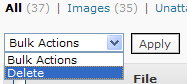
Would the delete button be there in the media screen if people could not delete? In a logical world, no. But wait, this is WORDPRESS we are talking about, which is not a logical world. It is a world of fucking insanity. I should have KNOWN this would happen. I should have uploaded an image and tested the delete.

So, I log in as an author, and I try to delete someone elses image. Gold, guys. Absolute gold. Love your work, NOT. When you try to delete someone else’s image, what do you see?

You are not allowed to delete this post.

ORLY? Let us not get into the fact that this is an image, not a post, and focus on the fact that IF PEOPLE ARE NOT ALLOWED TO DELETE WHY THE HECK DO THEY HAVE ACCESS TO THIS, HUH?

delete

Why allow authors to even see that drop down box if they cannot delete anything? WHY?

You know, I am a calm person usually. I don’t get tense about much. I don’t usually hate. But I do hate wordpress right now. Things should just work. End of story.

So now, I have a lot of creating users work to do, which I put off for the last 2 weeks until I had an actual solution. Little did I know, I had the actual solution all along. ROLL EYES AT WORDPRESS.

And you guys know, I don’t usually use the roll eyes. :)

I did find a couple of nice new plugins to test, though. More on that when I know that they actually work. ;)

Comment Timeout.

I’ve been testing a batch of plugins recently – some requested by bloggers I host blogs for, some that I thought might be good. Unfortunately out of all the plugins I have been testing, only one works with the set up we are all using. That one is Comment Timeout – and in fact is the plugin I thought we’d have the most trouble with given that we do run a lot of comment plugins.

I think it was Lightening who mentioned somewhere around the place how much trouble she was having with spam on the blog. One of the things that I was getting a lot of was trackback spam where spammers are putting trackbacks to my posts with drug names and sex sites etc. It happens a lot on old posts. For example – yesterday there were 25 trackback spams. Today there were 2 – and that is because I allowed comments on posts which had more than xx number of comments. I’m going to turn that off and see if it reduces the spam to 0.

Comment Timeout gives you the ability to close comments on old posts as well as treat trackbacks like comments. We’ll be rolling it out across the blogs on Monday and Tuesday of next week, and I might put together a post on how to use it.

On the not so positive side, it means people can’t comment on your older popular posts. So it is a toss up – do you want to deal with spam, or do you want people to be able to comment on posts you wrote ages ago? For me it is a no brainer – get rid of the spam!

The other plugins broke stuff, so apologies all but they won’t be appearing on our blogs. Unless you want stuff to break, of course. ;)

WordPress 2.6 Warning – DO NOT upgrade.

Yesterday I mentioned a somewhat serious problem with permalinks in the just released 2.6 version of WordPress. Now there is a new issue which is an even bigger problem. Users have reported not being able to log into their blog once they upgraded to 2.6 – there is currently no fix for this problem.

There is a work around that _ck_ on the support forums has figured out – Otto42 says in this post that the work around reduces your blog security and he highly recommends against using the work around..

This problem may not affect you – maybe you’ll be one of the lucky ones – but if it does affect you these are your two somewhat unpleasant choices -

1. Stop logging into your blog until there is a fix.

2. Use a workaround which may open a security hole.

The problem with option one is – who knows how long a fix could take – there is a six page thread and they haven’t worked out what is causing the problem yet, in fact Otto says there will be no resolution until someone gives them the info they need to fix the problem, and as yet nobody has been able to do that.

Also, there is the somewhat huge problem of not being able to log into your blog – no posting, no moderating comments, no nothing until someone works out how to fix this problem.

And option 2 isn’t a great option either – what if this workaround allows spammers and hackers to get into your blog?

The best option for now –

Don’t upgrade.

Spread the word about these issues to other bloggers.

Want to help spread the word?

Give this post a stumble.

Further Reading

Fix for wordpress 2.6 can’t login – A post from _ck_ who created the work around.
WordPress 2.6 Goes Live – note the comment from weneedmoney just above my comment – they can’t log in to their blog.
WordPress 2.6 Released Officially – note comments 58 and 62, who also had the same issue.
Read this before upgrading to WordPress 2.6 – panic happens. ;)
WordPress 2.6 – seems a lot of people are sick of the constant upgrades – will WordPress hear this message?
WordPress 2.6 upgrade–fixing a login problem
Upgraded to WordPress 2.6 – both permalinks and login problems!
Permalinks fail in WordPress 2.5 and 2.6 – Yep, another permalink failure.

(updated to add these links – if you write a blog post about this please link to my post so your link will appear in the trackbacks.)

Do Not Upgrade To WordPress 2.6!
WordPress 2.6 – Good or Bad?
How To Get Rid Of The Annoying WordPress Update Nag – Very handy for those who are not upgrading. And hey, WordPress, how about you remove the nag if you can’t create software that works? It is annoying.

WTF, WordPress?

Ok. So I was pretty negative about the 2.5 series of WordPress. I was hoping that 2.6 might solve all the massive problems involved with 2.5, might actually work properly rather than break things, and might be worth looking forward to.

2.6 has now been released a month early. And what a surprise to find out that they should have used that extra time to actually solve problems with the software. I’m not talking about small, insignificant problems. I’m talking about major substantial problems. Oh, like upgrading only to find none of your permalinks work anymore.

Many people have reported permalinks not working after upgrading to 2.6. In all cases, these people have permalink structures that contain “index.php”. This is a bug, detailed here.

Sorry Matt, but this is not what I would call “a solid release“. Not unless you’re taking some serious hallucinogenic drugs. This is more like catastrophic explosion after a very drunken night out on the town and a dodgy 3am kebab that goes straight through you and leaves you in great need of bleach and the toilet brush. Fun for everyone – NOT!.

I mean, that is a pretty big deal. If you have this problem, not only does it mean links to your blog don’t work but it is surely going to affect the search engines and SEO etc. How many people have installed it and not realised they have this problem? Not everyone goes about checking all their links once they upgrade. Not everyone checks the support forums to see what the problems are.

Surely someone could have spotted this problem during testing of the beta, before it was released to the entire universe. And now that they have spotted it, how about stopping people from being able to download it until you have fixed it? Because they’ll download it, install it, find out it is broken, turn up on the support forums to ask for help (not noticing there is a sticky about it at the top) and then post things like this. And this. And this.

What I am about to say may come as a surprise to WordPress, who clearly think we the users have all signed up to be a part of their major mind-f**kery of constant updates and tweaking combined with the occasional complete overhaul. But maybe they’ll hear us if I say it out loud.

WE JUST WANT TO BE ABLE TO BLOG.

We don’t want to upgrade to find things broken. We don’t want to be told that we need to upgrade because of security issues. We just want basic, simple blogging software that works. So how about you quit this insane “software development by torture” that you seem to love inflicting on your users, go away into a room, shut the door, create something that BLOODY WELL WORKS and then come back and release it once you have tested it A LOT.

And hello, how about you start listening to your users. Because there are a lot of them on the support forums who are trying to tell you how annoyed, frustrated and in some cases upset they are about your treatment of them. This post is a good example – but who knows how long it will stay there.

Here’s another good idea – organise your forums better. Why not have a forum for each version of WP that you release, so people can go in there and post their 2.5 questions in a 2.5 area, and people can put their 2.6 questions in a 2.6 area, rather than the absolute clusterf**k that currently exists.

Going in there and reading those forums, with the arrogant pissy bitchy “helpers” and on occasion moderators (other than Otto42, who seems to be a saint directly sent from Heaven, though I have seen that he still loses his cool from time to time and understandably so – I hope they’re paying you some serious money Otto and if not get the heck out of there fast!) gives me a major migraine. No wonder the helpers are bitchy – I don’t even know how they can stand to hang out there.

Even so – can’t these so called helpers try being nice to people? Can’t they understand that peoples blogging worlds are falling apart because WordPress released another broken version of their software? They don’t want something broken – they want something that works, and they’ve likely been scared into upgrading rather than sticking with what they already have that does work, and then they come to the support forums for help, and they are treated like they are the ones with issues. They’re not the ones with issues – other than the fact that they have installed software that sucks. Why don’t we look at the creators of the software that sucks to see who really has issues?

The fact that I now have to start testing yet another broken version of WordPress because people will likely want me to install it for them (and heads up guys, no freaking way am I doing that anytime soon) makes me want to shoot myself in the head. Good thing I don’t have a gun, huh people?

So yeah, looks like I’m in a bit of a bad mood today. It is just really frustrating to watch. :( And I only visit the support forums occasionally – in this case to get an idea of what the problems with 2.6 are before trying to test it myself, but when I do visit I leave with a splitting headache and a desire to start up my own wordpress wank blog.

I used to be such a fan of WordPress, but now I’m about ready to give it the flick and move to Injader. In fact I already have a test blog set up and have been playing with it. Injader is also free, but actually works and is created by an Aussie named Ben Barden who happens to be a moderator on the Aussie Bloggers Forums – we have an Injader forum there too. If I host a blog for you and you’d like to check out Injader contact me and I’ll send you a login.

Next Page »