Archive for the 'how to guides' Category

Assorted Blog Tip Goodness For Bloggers

Google, heatmaps, comments and spiders, oh my! There’s so much to know when you’re a blogger, so I keep putting together some of the little tips I am picking up to share with you. Blogger users take note, I have a couple of great ones for you here.

Have You Googled Your Blog Lately?

In order to get specific results for your blog put the following into the search box – site:www.snoskred.org – just replace the www.snoskred.org with your site URL.

If you want to search your own site only, you can also use Advanced Search and put your site in where it says Domain – Only return results from the site or domain. I use this all the time when looking for past things I wrote here.

For those of us getting frustrated with Technorati, it may be time to consider a Google search widget instead. I’m going to be checking further into this later today and may put a how to together for ya’all for future blogging tip goodness posts..

Find Out What Your Readers Click On

I read Create a Heatmap of Where Readers Click on Your Blog at Problogger and thought it might be something interesting to try. I put it on less than 24 hours ago and it is already showing me interesting information.

If you want to know more about your blog readers, this is an absolute must do. It is also really simple to do – and completely free!

Don’t Forget

I added a new section to my sidebar called Bloggers Are Helpful. It contains some of the best articles I have found about blogging. It is also constantly updated and in the weekly wrap up I will let you know what new articles have been added to it over the week.

If you have a helpful article which should appear in Bloggers Are Helpful, please email me or leave a comment linking to your article.

Blogger Issues.

Comments Policy.

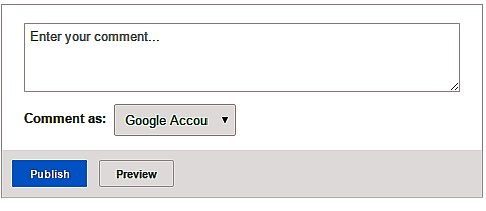
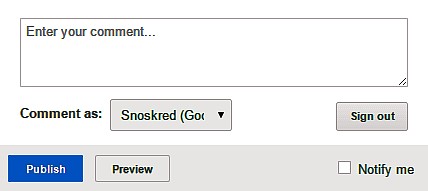
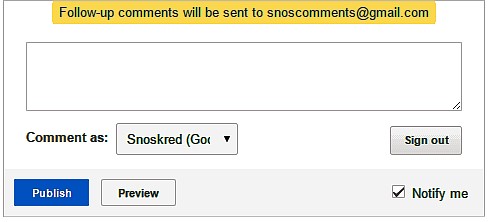
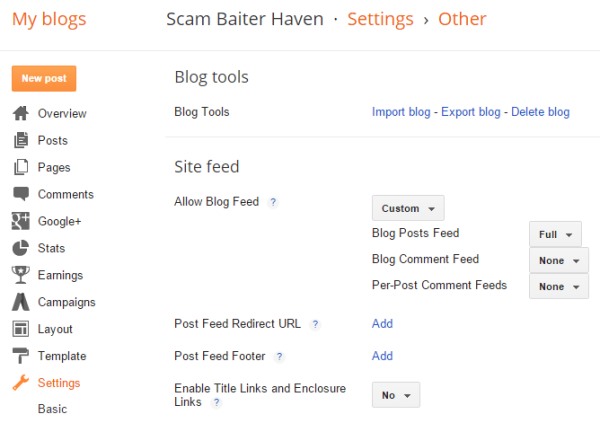
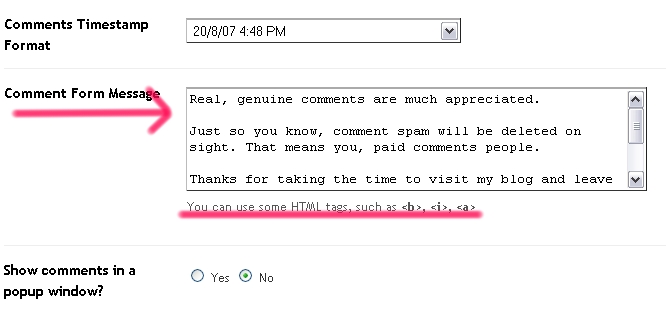
Did you know you can add your comments policy to Blogger? It will show up just above the box where people enter their comments. Here’s a quick screenshot guide on how to do it.

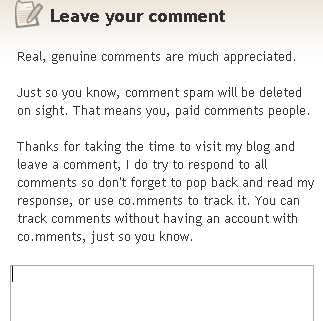
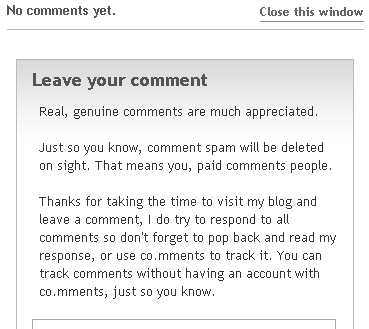
From your Blogger Dashboard – click on settings. Click on Comments. Find the box that looks like this. Type your comments policy into the box – and don’t forget to click save when you’re done! Now when your blog readers want to comment, they will see what you typed into the box directly above the comments box. It will look like this – Or perhaps like this if you have your comments appear in a pop up box.

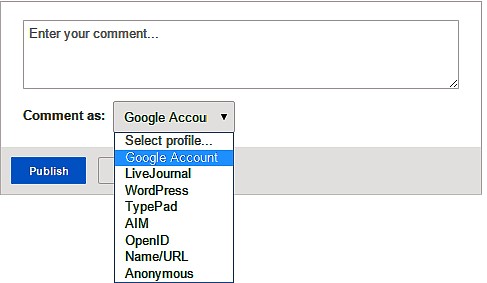
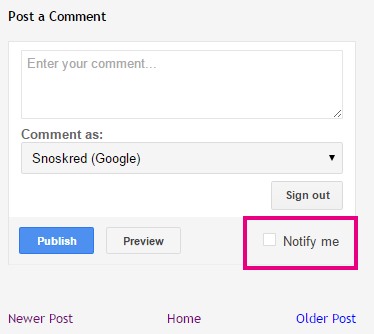
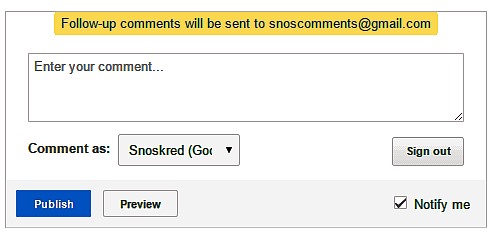
With Blogger you have a choice between a pop up comments box and a comments page – I prefer the comments page myself, which do you prefer as a commenter? and if you want your comments to be do follow I believe you can’t use the popup box. I’m not 100% sure on that one – anyone?

Where’s That Spider?

You may have read this post by Sephy where he talks about Blogger messing with the search engines. If you did not and you are using blogger, you need to know that Blogger has added a robots.txt file to your blog – without asking you, and without giving you any options of changing it.

What is a robots.txt? It simply tells the search spiders what to look at and what to ignore.

Blogger users are not able to submit a sitemap to Google – something ALL other bloggers can do, because it has to be on your site itself in .xml format and blogger does not allow you to upload .xml files to your blog. Blogger is telling the search spiders -

Sitemap: http://www.snoskred.org/feeds/posts/default?orderby=updated

That means my feed read becomes my site map. Not an ideal situation at all. :(

Bloggers on WordPress and some of the other blogging platforms have a huge advantage over us – they can tell Google what pages to look at, what pages to ignore, and also get their labels listed.

Get Smart

Therefore we Blogger users will need to become smarter about how we do things. That is what the Snoskred Is section is about.

I only had 297 of my 500 posts on google for some strange reason. Some of my much older posts which I used to get hits for on certain search terms seemed to stop getting those hits.

What I chose to do was take the time to go back through my posts and make a links list with keywords appropriate to the post. I put it in my sidebar. It is long (if you choose to do the same, you may need to use the scrolling html just to make it workable) and nobody may ever actually look at it other than the spiders. However I do hope that my readers find it useful as well, if they want to know more about me it’s pretty much all there.

You may want to consider doing something similar yourself. It’s your blog. :) At the very least my thought is that you should have your favourite 10 posts available in your sidebar for your readers to check out and get to know more about you.
Consider WordPress.

I am working on learning a bit about WordPress. I have it installed on another domain I own, and Sephy and I are just messing about with it, learning how it works.

I had been getting mixed messages on WordPress. Some people told me WordPress was difficult to use and for more technical type people. Some people told me it was the best thing since sliced bread. Having now messed about with it I can say both are true. It does require some technical knowledge, but it is also is the best thing since sliced bread.

Blogger is great for most bloggers, I completely agree with that. It is easy, simple to use and you can now get templates for Blogger that look fantastic. If you’re looking for a great Blogger template, I found this site the other day – Pannasmontata Templates – some of these are simply stunning.

For those of us who want a little more control – who want to be in charge – who don’t want Blogger making decisions on their behalf without asking them – WordPress may be the better option. Will I be moving this blog to WordPress? Probably not at the moment, but maybe in the future. I am going to use WordPress for the business blog, though.

Snoskred Is Getting Organised – Are You?

I am all for making positive changes in all areas of my life, but sometimes you have to put the blinkers on and focus your sights on one specific area. Right now for me, that area is organisation – or organiZation if you’re from the US – and time management.

I have good reasons for wanting to get organised. I want to start a business over the next two months. I realise that if I started a business now without having the right skills in place it just would not work. So it is time to take a deep breath, suck it up, and get to it. At the start of this week I made a personal commitment to myself – I am getting organised.

Now some of the stuff I am going to say here is going to seem.. lame.. silly.. possibly even stupid. In order for you to understand where I’m going you need to know where I am at now. I’m not going to lie to ya’all. ;) here’s my major issues.

I am easily distracted.

I have trains running just fine on the tracks but then suddenly they crash. IE – I can be in the middle of doing something and then my mind throws out something else I need to do, and I will stop and change direction.

I’ll be in the middle of writing something and remember I wanted to check a website. I will be in the middle of one task, and remember one that needs doing RIGHT NOW. Yes, this is happening as I type. I haven’t updated the Aussie Blogs List yet, cos I took a day off today.

It happened again just then, as I was typing this. I noticed my glasses were dirty. This brings us to another issue I have -

I don’t put things back where they belong.

I was watching a West Wing in the lounge room yesterday. Part way through, guess what happened? I noticed my glasses were dirty. So I came in here to my desk and took my lens cleaning cloth out to the lounge room. I had to stop typing this post to go and get it.

My computer is a mess.

On the inside, that is. Information goes in, but I have no easy system, no good way of finding things, my desktop has always been a nightmare of files just dumped there. In fact here is how it looked at the start of this week.

I need to take charge NOW.

When I am running my own business, working to deadlines? All those little distractions and things not being where they should be and not having a system of where things get put and how to find them again on the computer – these things are going to add up and drown me. Especially because the business I want to run is computer orientated.

So how to fix it?

Step One – Done!

Get my computer organised and start a system of where things go that will work for me.

Thanks to this wonderful article – How to Keep your Desktop Organized (without getting insane) my desktop now looks like this.

Step Two – In Progress

I am a digital packrat. There are folders full of files. Take for example our photographs. We have a lot of them. We never had a system for organising them other than to put dates on the folders. Consequently, we now have a lot of this – Yes, that right there is the date we began putting some kind of name on the folders. But the no name folders go back to *cringe* 2 years before that date.

There is no magic wand I can wave here, but thanks to another article I read – A 3-Step Cure for Digital Packrats, and How to Know If You’re One of Them – I now know how to cure it.

I’m looking through two folders a day, naming them, putting aside good photos I want to use for the thought of the day photos. I am also looking through two bookmarks folders a day, sorting, deleting, moving. This will take time – If I tried devoting one day to it, I’d still have a lot of folders not labeled. Better to do little chunks daily than overwhelm myself right now.

Step Three – Time Management – Done Daily

1. Create a daily list of tasks.
2. Give each task a priority A, B, C,
3. Ensure that you work on the “A” tasks first.
4. Handle each piece of paper on your desk only once.
5. Ensure that you make the best use of your time.
6. Don’t postpone anything – Do it now!

Step Four – Day Planner

Click the above for a bigger image

I have done this for the last three days and spent a day preparing for it before that. It’s rocking my socks, ya’all. You have no idea how focused I feel right now. It’s a happy feeling. :)
Step Five – Checklists
Yes, this is possibly the most lame of all the things I am doing, but it is helping me remember the things I do daily. I plan to update it in a week or so when I have identified more things I do daily. This is laminated so I can tick the boxes each day with a whiteboard marker and then rub that off ready for the next day. Yes, in the past I would forget my head if it were not screwed on, apparently. Now I have the checklists, sitting right in front of me, there’s not much chance of that.

Step Six – Email Check

One of the ways I get distracted is by the little envelope that pops up when I have new mail. Solution – open the mail in the morning, check emails, reply emails, close emails. Open again at lunchtime, dinner time, before bed. So if I don’t reply urgently, now you know why – and you can know when to expect that reply.. approximately.. ;)
Step Seven – Time Off For Good Behaviour.

This new stuff I’m doing is pretty intense right now, because I have a lot of organising I am doing. The major two things I need to finish are sorting my google reader and going through my archives here. These are both time consuming. So at lunchtimes, I step away from the computer for an hour. At dinner time, I step away for two hours.

I plan on having at least one light schedule day each week until I have a good handle on things, but I still want to make sure I get two of photos and bookmarks done each day. I took today off, got a haircut, went to see a house, put in an application so we might be moving, got my glasses fixed, did a little shopping. Whoa, what was that? Yes, we might be moving to my dream location. More on that tomorrow.

Step Eight – Buy In Bulk

The inexpensive things I find myself looking for, I need to purchase them so I can have one in each location I may need them. The lens cleaning cloth is a good example. They’re not expensive and it will cost me less to buy 2 more of them (I have 2 now, one in the car – one on my desk) than my time is worth to keep chasing them from room to room.

Step 9 – Put Things Back

The things that I can’t buy extra of, I need to put them back when I’m done. Simple, hey? It’s not as easy as it sounds, but I am committed to doing it.

What happens next..

I’m taking it one day at a time right now. I am hopeful that in three to four weeks I will become unconscious competent in being organised. However I think it may be a habit I need to keep working on and these skills of time management are going to be so useful to me in my business, I’m going to keep using them.

All I know is, I’m feeling motivated. I’m sleeping a bit less because when I wake up, I want to get onto the daily tasks I have set. I’ll update you urgently on developments. ;) so stick around!

10 Easy Ways To Improve Your Blog Writing.

I hate it when I see good bloggers say “I’m not a good writer”. If you’re not a good writer, I wouldn’t be reading your blog. If I’m not reading your blog, do I know about your blog? Drop by and leave me a link to it in the comments.

Having said that, there are some things I do now that I never did previous to blogging, and here’s 10 of them all neatly typed up for ya’all.

Write a summary –

Tell your reader why they want to read this post you have written in the first few sentences. Since getting on the Bumpzee Community RSS feeds, I have found that the first 250 characters of your post have to grab the reader in order for them to click through and read the rest. Basically this applies to anything you write – people need to be almost *teased* into reading the rest of your article.

Use the Thesaurus –

Tired of using all the same old words? Put the word you’d usually (commonly, consistently, customarily, frequently, generally, habitually, mainly, most often, mostly, normally, occasionally, ordinarily, regularly, routinely, sometimes) use in at the online thesaurus.

You can then take your pick of new, exciting (animating, appealing, arousing, arresting, astonishing, bracing, breathtaking, dangerous, dramatic, electrifying, exhilarant, eye-popping, far out, fine, flashy, groovy, hair-raising, heady, hectic, impressive, interesting, intoxicating, intriguing, lively, mind-blowing, moving, neat, overpowering, overwhelming, provocative, racy, rip-roaring, rousing, sensational, spine-tingling, stimulating, stirring, thrilling, titillating, wild, zestful), unusual words you don’t normally use that mean virtually the same thing!

Write ideas down -

I go nowhere these days without paper and a pen. NOWHERE. I have paper and a pen next to my bed, next to my recliner in the lounge, in the kitchen, in the car, in my handbag. Yes, even in the bathroom!! A lot of my best blogging ideas come to me as a surprise in the shower. I turn off the shower, even mid shampoo, step out, dry my hands, write it down. I find that if you do not seize the moment, that thought will vanish.

Record it –

Want to blog hands free? Do you have one of those little tape recorders students use for recording lectures? I have a Sony recording Walkman which uses cassette tapes but you can get digital voice recorders quite cheaply these days. So you can verbally blog while doing your chores around the house and when you get a chance to sit at the computer and type it up, you know where you’re going.

Edit it -

Cugat helped me learn how to simplify my writing when we were working on a website together a few months ago. I use a lot of extra words. Really and Actually are two such examples. Just doing a quick word search of the blog front page before posting this, the word really appears 6 times and once in the sidebar. Actually appears 3 times. This is a major improvement for me. I’m still working on it.

Don’t edit it too much -

Editing can be a temporal vortex. Like when I go to the hardware store and two hours go by without me even noticing it. I have sometimes spent up to three hours doing it on some posts. It’s better to limit yourself to a certain amount of time. For a longer article it may be appropriate to spend an hour tweaking words and cutting words out. My advice is use a timer with an alarm, set the time you’re happy to spend editing (that could be anywhere from 2 minutes to an hour) and when the bell rings hit publish.

Use Headlines –

If you think readers of your blog read everything you’ve written in a post, I am sorry to tell you that you may be wrong – some readers skim, some readers scroll before deciding to read something in depth. So you’ll see some of my blog posts these days use headlines, in particular the ones which are intended to be helpful to fellow bloggers or the general public. The one you’re reading now is a good example. Doing this makes it easier for readers to focus on the parts of your post that are relevant to them.

Use Paragraphs –

The larger the chunk of text, the less chance some readers will delve into it. Breaking things down into smaller more palatable chunks increases the chance of those things being read.

Size Matters -

There is nothing wrong with a short post. Don’t be afraid to post something brief. Embrace the pithy. On the other hand, long posts can be scary to post because you think people will not read them. If your content is good, people will. Have faith in your readers. But for longer posts try to use small paragraphs and headlines if you can, to make it more accessible to all readers.

Invite Comments –

Your blog is where you can express your views. Ideally you will want your readers to express their views in return. Unless you think your bowel movements don’t stink and your opinions are right, perfect, and not to be discussed, in which case you will turn comments off. This will offend people. If you don’t have comments on your blog, chances are I’m going to unsubscribe from your RSS feed. Just so you know.

A final thought –

Don’t ever say you’re a bad writer. I don’t believe there is any such thing. You may not be writing novels that stun the public but blogging isn’t about that.

Writing is about communicating ideas and connecting with people through words. If you’re on my blog roll, I think you’re a good writer. Take the compliment with grace – say thank you, don’t try to tell me my opinion is incorrect.

If you’re not on my blog roll yet, chances are I just haven’t found your blog. Comment on this post with a link to it, I’ll drop by and check you out.

Thoughts On Making Positive Changes – Can You Do It?

Over the last month I have made one big positive change in my life, and I have a few thoughts on the process of making change which might be useful to you. Have you ever heard of the conscious competence learning matrix? Basically it is 4 stages which you have to go through in order to learn a new skill. The four stages are -

Unconscious Incompetence

You don’t know anything about this new skill – You may know others have this skill but you may think it won’t work for you, you may think you don’t you need it, you may think you’re not capable of learning it it – you need someone to point out how this skill can benefit you before you are willing to consider learning the new skill

Conscious Incompetence

You are now aware of this skill – You are aware that you do not yet posess this skill – You realise that this skill can be useful to you – you make a commitment to learn how to perform this new skill.

Conscious Competence

You are now able to perform this skill without assistance from others but it requires concentration and thought – You are able to demonstrate this skill to others – You now have to commit to practising this skill over and over in order to become unconsciously competent in this skill.

Unconscious Competence.

You have practised this skill so often it enters the unconscious – This skill is now second nature to you – You can now perform this skill while thinking about something else and without concentration – You can now teach this skill to others – Over time you may become less able to teach this skill because you will find it difficult to explain how to do it.

The Four Stages –

Think it’s a load of psychobabble?

Think again. Can you drive a car? Sew? Knit? Type? Paint? Draw? Play a musical instrument? Ride a bike? You have been performing the four stages of learning all your life. You may not have known the name of it until reading this post, but if you take a moment to consider you’ll agree the four stages is exactly how you have been learning to do things.

The exact same process happens when you want to make a positive change in your life. You decide that you want to – lose weight, drink more water, be more positive, get organised, exercise more, play the piano, change a habit, learn any new skill, it could be anything. You think making this change will benefit you. So you make a commitment to change.

The most difficult part is the “practice” – the actual making the change. Unless you *make* yourself practice you will never make the change. Here’s some tips to make it a little easier for you.

This Is Also Known As –

Setting a goal. Sort of. Sometimes a goal requires a lot more work across a lot of different areas, so for the purpose of this post I’m talking more about forming good habits, routines and making *one* positive change at a time.

Pick One Change And Go With It -

Choose the most urgent thing you want to change and focus on changing that. Do not sabotage yourself by trying to change several things at once. You’ll do a lot better if you focus on one at a time. (I made this mistake – on top of the water change I wanted to get more organised. One had to give way – so now I will focus on the organise change I need to make)

Embrace The Need For Change –

You’ve got to want it bad! You have to be passionate about it, long for it, LUST after it! If you don’t want this change, you will find ways to undermine your own efforts. It is sometimes a good idea to write the benefits of making the change down and putting it somewhere you’ll see it often, to remind yourself why you want to make this effort.

Make Success Simple –

If the change is drinking water, carry a bottle with you. If the change is get organised, take time to put systems in place that you can follow. If it’s exercise more, hire a treadmill or exercise bike, whatever floats your boat. Identify how you can make this change easy and simple and then do that first, before you try to begin making the change.

Watch Out For Thwarters –

Friends, family, loved ones can be your worst enemy when it comes to making a change. They like you the way you are. They may not want you to change. They may fear you will leave them behind, not need them anymore. If they can’t get on board, they need to get out of your way – and you may need to push them out of your path.

If you explain to them you want to make this change, you need to make it, and you’re going to make it so you would appreciate their support, and they do not wish to give you the support you’re asking for? That’s a bad sign right there.

I’m not saying cut them out of your life completely, but perhaps it is a good idea to take some time out for yourself to focus on the change you’re making. Do not let anyone hold you back. Don’t let anyone argue with you about it either. You may find it best to – close your ears – smile – nod – ignore – when they try to talk you out of it – and some people will regardless of how much they claim to care for you and want the best for you. Be prepared. Don’t be surprised when it happens.

Look For Supporters –

If you can find people who want to make the same change or even a different positive change from the one you want to make you can support each other. There is nothing like surrounding yourself with people in the progress of positive change. There may be a support group for what you’re looking to do – if not in real life, on the internet. Be wary though, sometimes support can = thwart!

When You Want To Quit –

Keep going. Usually during the first or second week, you’ll have some second thoughts. You’ll think about giving up. You want to quit. Push through it. Don’t allow yourself to give up on your change. You decided to make the change for good reasons and whatever inconveniences you may be experiencing will seem like nothing in a couple of weeks once you get to the unconscious competent stage.

Chart Your Progress -

If the change is something like drink more water, make a simple chart where you can tick off each cup you drink. If it is exercise more, make a chart where you can tick off every half hour of exercise. Whatever your change, try to find a way you can tick boxes for yourself – and always use a tick (positive), never a cross (negative)!

Remind Yourself -

I once had to change my name. I was working in a call centre, and when you answer the phone if you have a longer name there is a better chance the person listening will catch your name if it has more syllables. EG – “This is Ben” will tend to get people saying “Who is it?” whereas”This is Benjamin” you get a lot less “Sorry, I didn’t catch that” which cuts down on your call time. So I wrote my full 3 syllable name on post it notes and stuck it all over my desk. Anywhere I would be looking when I answered a call merited a post it note.

A skill you quickly pick up in a call centre is the ability to listen to what is going on around you as well as on the phone. I heard people discuss my “lack of memory” “That poor girl can’t even remember her own name!” “Doesn’t she know who she is?” – it got so annoying to me that I sent out an email explaining why I had my name all over my desk. Guess what happened next? All kinds of post it notes began to appear all over the office.. I started a trend!

So, write yourself little notes about the change you’re making. Put them in every room you spend time in, where you’re going to see them. On the fridge, on the TV, on the back of the toilet door, on your bathroom mirror, on your bedside cabinet, on your computer monitor.

Reward Yourself.

If you practice, there will come a day when you do this thing without even thinking about it. That day came for me a few days ago, when I noticed I had gone through a 1.5 litre bottle of water during my day without once *thinking* about it. It will happen if you have practiced, so make a plan of how you are going to reward yourself for the hard work you’ve put in.

When The Day Comes -

Celebrate it, you did it! :) Then pick the next thing you want to work on and get started. You’re on a roll, so keep it going. ;)

Don’t Stop Now –

If your choice was to lose weight – most people who made the choice to lose weight put it back on eventually – that is because they get *out* of the good habits they made in their life. When you make a decision to lose weight that is a *lifestyle* change and you have to be committed to it for LIFE. As soon as you stop practicing the good habits you will find the weight creeping back on.

If You Do Stop –

Just as you can get back on the bike and remember how to ride it without having to learn from scratch, you can do the same with any of these changes you committed to making. So simply get back on the bike and start pedaling towards your original goal again.

What Change Did I Make?

In case you didn’t know, I challenged myself after reading this article 9 Great Reasons to Drink Water, and How to Form the Water Habit to begin drinking more water. I used to drink Coca Cola – one can a day – and fruit juice or coffee. I wasn’t getting enough liquids and water retention was a huge issue for me.

Week One –

Visits to the bathroom were more frequent than usual in this week. I was expecting this – the article had mentioned it. It wasn’t too bad but there was one day I felt like quitting the whole thing because I was back and forth too often. Push through that urge to quit. Just keep going!

Two Weeks Into Making This Change -

I noticed a big difference with respect to water retention. The backs of my hands went all wrinkly. The puffiness went away. My body could now rely on me to get enough water during the day and it wasn’t holding to any nugget of water it could get just in case it didn’t get more. Visits to the bathroom were now less frequent than *originally* – I was so glad I didn’t quit!

Sometime In The Third Week -

The unconscious competence kicked in. I was keeping a bottle of water on my desk and suddenly I did not have to remind myself to pour a glass and drink it – and I’d filled in a whole day’s worth of ticks to my chart without once noticing I was doing it. I got some scales at the start of the third week because I thought I’d been losing weight and found I was 10kg lighter than the last time I weighed myself, but that had been over a year ago so I couldn’t be sure it was due to the water. Clothes that fit well three weeks before were suddenly a bit roomy, so I think at least some of the loss was due to it.

I have been so busy drinking water that some mornings I found I wasn’t having my coffee until lunch time – which gave me headaches. This week I focused on making sure I have that morning coffee in the morning. Yes, I am a caffeine addict but during this challenge I’ve cut back to 2 cups a day rather than my usual 4 cups. Wow, what a difference!

Four Weeks Into Making This Change -

I’ve lost 3kg (6.6 pounds) over the course of one week, without making any changes to eating or exercise – in fact I’ve been eating 2 pieces of Lindt chocolate each day, something I normally do not do! Now I’m reasonably confident a large part of the weight loss was due to the water drinking. I can see a noticeable change in the mirror. I’ve been working on getting the hands less wrinkly but it will take time for the skin to shrink back after losing the puffiness.

Was It Worth It?

Absolutely. I am feeling a lot better for it. Now I’m all about the next change, which is getting more organised. Over the next week I’ll be putting systems in place to help me do that. I wanted to do it at the same time as the water change but I found two changes at once was too much for me.

Did you find this article helpful?

Let me know in the comments section. :) Let me know if it inspires you to make your own change, too! ;)

Next Page »