
Google Reader no longer exists. You may want to check out Inoreader instead. Here is a great post about Inoreader – Still Looking for a Home for your RSS Feeds? Try Inoreader
google reader
14 Reasons Readers Unsubscribe From Blogs.
Recently I’ve been working on clearing out my feed reader. I have gone from 215 subscriptions back to 143 – a huge drop. This is no easy task, but some bloggers have made it easy for me to make the decision – keep reading, or unsubscribe? Here’s some of the reasons why I have unsubscribed from some of the blogs.
1. Posts Too Long.
Writing one huge long post every week and posting rarely in between. There was one blog on my google reader, I kid you not, who would write posts averaging between 4,000 to 5,000 words once a week. Was it anything I could use? No. It was simply egotistical shyte where the blogger answered a whole bunch of questions other readers had asked – some of you may know the blog I mean..
Their last post in my reader was 5261 words, 28792 characters and just to give you an idea, I pasted it into word. It went for 15 pages. ONE POST!!!!!! And people say my posts are long, ya’all ain’t seen nothing yet! Just for comparison sake – this post is 2199 words long, 11276 characters and was four pages when I posted it into word.
I don’t mind a long post, if you have something useful and interesting to say. If you’re just pandering to your massive ego, I’m hitting unsubscribe.
2. Posts Too Pithy.
Every post they wrote was three lines or less. Every. Single. One. I enjoy pith as much as the next person, but there is such a thing as too much pith. Give me some substance!
3. Where Are You?
Some of the blogs deleted last week had not been updated at all in over 6 months. Hello, these bloggers had people who were reading you and they went and blew it. Maybe they got busy. Maybe they got a life. Maybe they got hit by a bus. I don’t know, and now I’ll never know, because they just left me hanging. I’ve unsubscribed. Readers of this blog will be happy to know, if something happened to me I have a plan all ready to deal with it. You’ll never be left wondering here.
4. They Went Quiet.
They used to post regularly and I was loving it, but now I realise I haven’t heard from them in a couple of months – and their last post didn’t say “I’m going on holidays” “I’m taking a break from blogging” “I have to do (insert important thing) so you may not hear from me so much over the next few (length of time)”. If it did, I’d be ok waiting. Seriously. We all have lives to live.
They have a term for this with nuclear submarines – going quiet. Unless you happen to be living in one, it’s not a good idea to do it with your blog. Readers will unsubscribe – like I just did. It is a good idea for bloggers to let their readers know if they are going to be away for a bit. It’s a nice thing to do for their loyal readers.
5. They Are A Wanna-be.
I linked to them for at least 6 months and I told them I was linking to them via a comment. They never linked back. They never dropped by my place and left a comment. In their links list all I see are “a-list” bloggers. All they talk about is what the “a-list” bloggers are saying or doing. If I wanted to know what the “a-list” bloggers were saying or doing, I’d be reading the a-list bloggers. I don’t read the a-list bloggers. I wanted to read *them*, not some poor soul wishing they could be on the “a-list” and sucking up to the “a-list” bloggers in every post.
I’ll give that link to another blogger who deserves it more. Just a hint they might be able to use – Spread your link love around and base it on content, not what supposed “list” the blog is on.
6. I’m Not Feeling It.
In order for me to read a blog, I have to sometimes know what the blogger is talking about. There is one blogger I deleted because they write these major in depth posts that read like a legal document. On a personal blog. There is never any personal posts, never any images and a lot of 50 cent words you only hear used in spelling bees.
If a blogger is writing like that on their personal blog, maybe they need to take a holiday. Relax. Not that I can’t handle in depth posts and legal wording but from time to time, chill out and have a laugh! Tell me something funny that happened. Lighten up.
7. I’m Overwhelmed.
Some people post too much. Two to three posts a day is one thing. Four every day, a blogger may be pushing it. 5-15 posts a day is way out of control. I want to know about the bloggers I read, but I don’t want to know every single detail that happens in their life! Learn to edit. Write things and put them aside for a wrap up post, one longer post instead of 6 short little ones.
Writing doesn’t have an expiration date. It is perfectly fine to write 5-15 posts in a day but a blogger can schedule them to post over the next couple of weeks. They will feel fantastic because you know their blog is posting the things they wrote, and readers will feel good because they get to read it in small, manageable daily chunks rather than one huge mind dump. ;) Don’t pummel your readers with posts!
8. The Content Went AWOL.
Some bloggers have got into paid posts so much that it is all they blog about anymore. I’m all about supporting a bloggers right to make money but if bloggers aren’t providing non-paid content as well, they will lose their readers, and consequently find it harder to get paid blogging jobs. My preference is that bloggers follow up a paid post with non paid content soon after posting the paid content, at least on the same day.
9. The Content Was Negative
Not one positive post in the whole time I’ve been reading? Some bloggers just want to whinge and they are not prepared to look at the positives in life? Sorry, that’s not for me. I prefer positive thought. Occasional snark is one thing, I can appreciate that. Being mad at the world 24/7/365? It’s depressing the heck out of me. Let me off this rollercoaster ride into negativity!
10. I’m Waiting.
One post a month? One post every two months? Seriously? Are their readers so unimportant to them? They have nothing to say? They can’t find a news article to speak about? They can’t post a photo and one line of text? I have to tell those bloggers, I think maybe they are too busy to have a blog. Seriously. I’m unable to deal with such long gaps between posts unless the content is *incredible*.
11. They Moved.
Without telling me more than once – and now I’ve lost that connection to them. Here’s a piece of advice for moving bloggers. Keep the old blog for at least a month. Once a week during that month, post a reminder that the blog has moved have moved on the old blog. That’s for feed readers of the blog, who may not have received the message that the blog is moving the first time. A reader may have hit “mark all as read” because there were 500 posts in one folder and they couldn’t face reading it.
Give your blog readers every possible chance to follow you when you move. They are not expecting you to move and are unprepared for it. Me personally I’d be posting “I’ve moved here” once a week on that old blog for six to eight weeks.
12. They Were Cliquey.
Some bloggers just want their friends reading. It might be best to make their blog private so readers don’t get attached to them. It can be hurtful to people when a blogger totally ignores some readers and comments, while responding to others.
13. Template Issues.
Every time I visited the blog, there was different template. And I visited the site a lot over the space of a few weeks, I said via comments how much I liked a couple of the templates but one day I got tired of the constant switching, things moving around.. it was just too much. Sorry. The content was ok but not good enough to overcome the massive template indecision.
14. They Told Me They Were Quitting.
I understand. I’ll miss them. In order to keep the blogroll alive, I’ve taken the link to that blog down but if they come back, I’ll put it back up before I finish reading the first post saying they are returning to blogging, I promise. I enjoyed their blogging and I hope they return.
But Wait A Minute?
Some of you may have read this list and thought “I do that” “Ouch, I’ve made that mistake” or even “I never realised how annoying that could be to my readers, I’ll never do it again!” If so, that is fantastic. It will make your blog even better – for me and for all your readers. Perhaps now is a good time to take a moment – to consider whether you are being considerate of your blog readers and mindful of what could make them unsubscribe from your feed.
If your name is still on my blogroll, it means one of two things.
1. You are linking to me, which I deeply appreciate, thanks! I’ll never de-link you while you link to me. If I did it by accident please let me know. This job has been evil and I have been working on it for over a week now and still have not tracked down everyone linking to me.
2. I love you so much I can’t let you go. Even though you don’t link to me. It would be nice if you did, but I enjoy your writing and I’m giving you that link because of it. If you don’t enjoy mine, you probably shouldn’t be linking to me.
My Future Policy – updated 26/1/15
If I like your blog, I add you to my feed reader. Once a month I do a new feeds post which you can find here.
After 6 months, I review the blogs I added and decide whether I am keeping them or unsubscribing. If I am keeping the blog, it will be listed on my blogroll.
Further Reading
This post is now accompanied by a post from Sephy with a lot of how-to info on RSS feeds. He’s great at taking the tech out of technical things so non technical people like me can understand them. Make sure to read it!. You may also want to have a look at these useful articles –
- Top 10 Sins of Blog Usability
- Thirteen Blog Clichés
- Simply said…How To Blog
- 7.5 Reasons I Abandoned You Today
- Top 7 blog mistakes to avoid
Over To You.
What are your thoughts? What is your policy on linking to blogs? Do you struggle with who you should give the link love to? Do you feel bad or rejected when people don’t link back to you? What about when people delete their link to you? Do you have blogs you’re hanging on to which you would love to delete? Comments are closed, so you can contact me here to let me know what you think.
Get you some google reader?
Christine mentioned in yesterday’s comments that I should stop by her blog as she had lots of new posts.. Well I have a little something to tell you. I’m there, all the time – and not only am I there, I am on 140 other blogs, plus about 120 bumpzee blogs, all at once. How can I manage to be in so many places? Is there magic involved? Click for a better view –
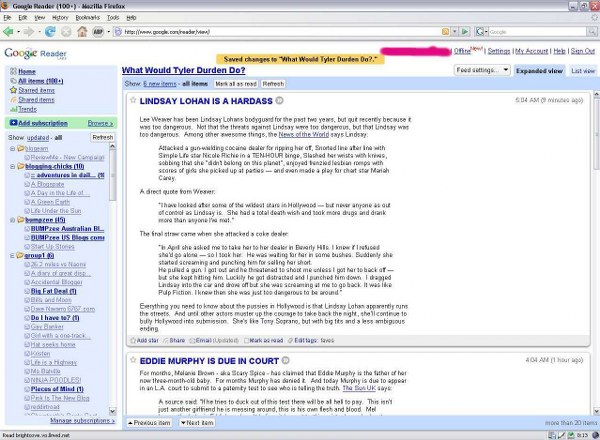
Yes, there is – google reader magic. Anytime you write a post, it comes to me as a surprise in my google reader, usually within 2-3 hours of you posting it. This means I can know what is going on everywhere but the one downside of google reader is, it does not tell a blogger who is reading their feed. That’s why I usually leave a comment to let people know, hey, I’ve got you in my google reader now. Of course unless I fully explain that then people have no real idea what that means, so I hope this post helps to let people know that I’m blog-stalking them all the time without them having a clue. :)
So you can see by looking at the picture above that I have some folders in there – because there are so many blogs I like to divide them up into groups – and that the blog names which have new posts are in bold with a number after them. When you click on the group name (ie group1) you get all the newest posts from that group to read through. It really has changed the way I read blogs – and there is no way I would be able to read so many blogs without it. If you don’t use it, I highly recommend giving it a try.
I do have to apologise though because this weekend was pretty crazy with all the stuff I had going on, I missed out on commenting on about 100 posts which I had something to say but not the time, so please accept my apology for not dropping by on a lot of blogs just recently.
We made pizza, which seemed to take a very long time. We played pool. We did a fair bit of housework because things were getting quite messy and The Other Half’s bathroom looked like aliens had landed in there due to me buying him a new towel and then him getting towel fluff on every surface possible. Do not ask me how he managed this for I do not know! I did some painting. We went beach walking – and I have some photos, coming soon. ;) I re-did the template for this blog, and I also have been working on blogzreview, and I caught up on West Wing episodes, managing four over the weekend yay!
Those members of the Australian Blogs Community as well as the US blogs community may not know that they’re coming through to me on an RSS feed via google reader. This means I can read all the community blogs at once. It only gives me the first 250 characters, then I have to click to read the rest. It is really handy. Here’s a view of that.
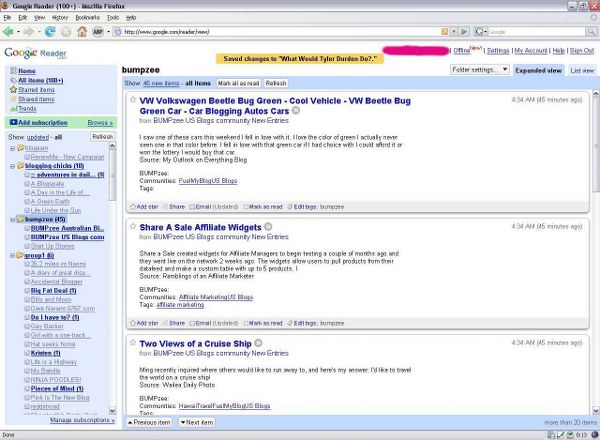
So, hopefully now you know that even if you don’t see me on your trackers, I’m still reading you loud and clear, and I’ll be dropping by when I get a chance. ;)
My new blog commenting task.
I’m going to set myself the challenge of visiting all the blogs in the blogging chicks network, and commenting on as many as I can. I recently joined the network and I can’t wait to get into reading through the blogs on it. You can see the list of blogs in my sidebar. If you’re a chick you should join. ;)
Also, I’ve finally finished adding the blogs I read in google reader to my sidebar. This means I now have some organisation going on here people! And one of the new things I am implementing is a “new blogz” folder in google reader. When I find a new blog I like, I’m adding it to that section and commenting to people that I’ve added them to my google reader. Hopefully depending on the amount of time I have, once a month or so I will go through and add them all to my sidebar.
It might seem like I’m a slave to reading blogs if you look at the amount of blogs there. The truth is quite different. I’m a really fast reader. I always have been. On average it takes me 2 hours to read a book of average size. So when it comes to blog reading, I turn up here with my coffee in the morning and I whiz through 100+ blog posts in the space of half an hour. Any ones I want to comment on (and this is becoming more and more lately) I open them in a new tab. Once I’m done with coffee, I spend a little time commenting, then it’s off to other tasks for the day. From time to time during the day when I have completed a task, I reward myself by checking in on any new blog posts. Not all of the people on the list blog daily, some of the people on the list blog once or twice a month.
Email Shenanigans
I got an email some time ago, but it only just *arrived* in my inbox today. That’s because Gmail put it in the spam box. I wish I could delete the spam box. :( I don’t usually check the box associated with this blog, it forwards to my main account. When I went in there today to reply to a mail that had missed the spam box, there were 305 spam emails sitting there. Its only by luck that this mail didn’t get deleted because usually gmail deletes the spam after 30 days.
It was from someone who reads this blog politely requesting a blog link trade. I went over and read his blog and I really liked it, so it’s now in the list of blogs I read which happens to be way down in the sidebar. I must clean that out soon. The owner of it wisely is not giving his real name – if only everyone on the internet were so careful! ;)
I have been so incredibly not good about putting all the links I want to put in my sidebar. You guys, I read like 129 blogs in my google reader. I have not linked to them all. I just don’t have time, I am really busy with projects – and reading blogs, by the look of things. ;)
There may be a new project which I will want to talk about here some, soon. It’s a task I have put off and put off for ages, but now I am beginning to accept that this task must be done in order for there to be a decent future.
So a bit of an update..
on google reader. Because if you are not using this, you should be. It’s fantastic. I went into this without having a clue how to use it. The first time I created a folder I wondered what the heck I’d done, and desperately tried to find a way to delete it.
Now I have all my blogs organised into folders (Faves, Nablopomo, Scams, Updated-Often, Rare-updated, and share ok – that’s where the bloggers who have said I can share their posts in my little side window thing are, makes it easier to keep on top of it, am I already sharing your blog? If not, can I share your blog? If yes leave a comment!) and I can read all the unread posts from the blogs in that folder just by clicking on it. This saves me a massive amount of time and effort.
It’s really easy to set up, and once you play with it and get used to it, you’ll grow to love it as much as I have. The only downside is it sometimes takes a little while for posts to turn up there, it can be up to a half hour delay. But what’s half an hour between bloggers? :)
One thing I am going to do, over the next week or so, is visit all the blogs I am reading with google reader and let them know I am still reading their posts. That’s the only downside to google reader – you don’t visit actual blog pages as often unless you want to comment. And for the last 2 weeks, I’ve been all commented out. Sorry about that!
I just made a little cheesecake and a startling confession to the other half who now wants to either disown me, or buy a cheap big screen tv so his is not defiled by me watching Desperate Housewives on it..
I got this sharing thing working.
I really don’t want to share stuff from other people’s blogs without them giving me permission. So I’m probably going to have to go around asking you all if it’s ok. That’s going to take me like forever, especially as many of you don’t seem to have an email address anywhere I can spot it.. ;)
If you give me permission it means I am going to share any posts you make, and they will appear in the little pink thingy over there —-> under stuff I’m reading. They’ll also be put on my shared google reader page, but I don’t plan on doing anything with that, I’m not going to put it in the sidebar or make links to it here.
This means people would see the title of your post over in that little pink box, and they might click on it to go and read what you’ve said. I’ve put a bunch of posts from my other blog over there, you can see how it’ll work. Click on them, try it out. See what you think. :)
So if you would be ok with this please post a comment on this post, and of course at any time you can email me to say you’re not ok with it anymore. :)
Google Reader
Have I been living in an internet cave, or something? How did I not know this existed until a few days ago when I spotted it in my referer list?
This Google Reader is going to save me an incredible amount of time checking blogs daily. Now, when you update your blog, it tells me. I can read what you’ve posted in the Google Reader, or I can click one button to be transported to your site to read the post and comment. Wicked! Yes, I am clearly behind the times on this, but I know I’m not the only one.
For Dr Anonymous who posted a while ago about bitacle stealing content – I think how bitacle is doing what they are doing is via an RSS feed. Bloglines do it as well as Google Reader. You can turn this off with your blog, if you like – that way if someone wants to read what you’ve written, they have to physically visit your page. Otherwise, they can use a tool like Bloglines or Google Reader (and there’s probably others I don’t know of too) to grab your posts and read them.
Other options include changing your blog to only show a few lines of your post and then people have to click on “continue reading” so they have to visit your blog to see the rest of your post. I personally don’t love blogs that do that but if I’m a reader of yours already I’m not going to stop reading you just because you do that. ;) However, if I’m visiting NaBloPoMo blogs, I’m generally not going to click on continue reading, I find that I click on the little red cross instead. It’s just annoying, no offense to anyone.
So with Google reader you can “share” posts with others. Have a look, for example, here. So I could put that link in my sidebar, and then people can read the posts of bloggers that I share. It’s done on a one by one basis, you can’t just pick a blogger and share all their posts, by the look of things.
If you’re a blogger that I read often (and you guys know who you are, in general) and you’d be ok with me sharing your posts in this manner, please either comment here or shoot me an email. I’m hoping I can eventually put the shared things into a box on the sidebar, when I work out how to do it, so people would be able to see the title of your post and it would have the most recently shared things.
So, don’t be surprised when I am commenting on your latest posts within nanoseconds, or wonder why you’re not seeing me on your site meter daily. I’ll be there, when you post, cos I love you guys and want to read what you have to say when you have to say it. As opposed to a daily check in like I used to do. ;)